


2nd Phone Number: Text & Call
4.04.16K Reviews
App Specs
- Version
- 2.4.3
- Updated On
- License
- Free
- Downloads
- 5,000,000+
- Developer
- Dingtone Communications Ltd
- Categories
- Communication
- Platform
- Android
Screenshots
 Analysis by AppCompare
I judge a second-number app by what happens when I need to use it quickly: can I tell which line I’m using, reach the right person, and keep my main number out of the exchange? 2nd Phone Number: Text & Call is a communication app from Dingtone Communications Ltd built around that separate-line use. It is free to install, with optional in-app purchases, and its appeal is simple: a second number can be useful without carrying a second handset. The important question is whether that convenience fits the way you actually communicate.
Quick tasks, with a few things to check first
For ordinary use, the idea is straightforward: keep the app’s number for a defined purpose, then use it for texts or calls tied to that purpose. That can mean giving it to a marketplace buyer, putting it on a temporary event notice, or using it for client enquiries while keeping family and friends on your usual line. The separation is practical, but it works best when you decide in advance which conversations belong on which number. Otherwise, a second inbox can become one more place to check.
I would not assume that choosing a number is the only step involved in making the service suit every contact or destination. Before sharing it widely, I’d test a call and text with someone I trust, confirm that the other person sees the intended number, and make sure replies return to the app. That small trial is especially worthwhile before using the line for a client, a time-sensitive pickup, or any conversation where a missed response would cause trouble.
How it feels when communication gets busy
The app’s value is clearest when several kinds of communication overlap. Picture a freelancer arranging a delivery while answering a client and coordinating plans with friends. Keeping work enquiries on a separate number gives those conversations a boundary, while blocking unwanted contacts can help keep a persistent nuisance from taking over that line. The trade-off is that separation takes a little attention: I’d check which line is active before starting a call or sending a message, particularly when switching between personal and work conversations in a hurry.
For heavier use, I’d treat the second number as a focused channel rather than a full replacement for a primary mobile service. A handful of short exchanges is a different workload from relying on one number for every call, message, and urgent contact. If you expect a busy day, make a habit of opening the app and checking for replies instead of assuming every conversation will be noticed at the same moment. That is a sensible routine for any separate communication channel, and it matters more when people are depending on you to respond.
Reliability means planning around the other person
A second line can protect your privacy, but it cannot guarantee that every recipient will treat it like a familiar personal number. Some people may call back later, save the number, or start a new conversation without explaining who they are. I’d make the purpose clear in the first message—for example, that this is the number for a particular sale or project—so the other person has context when the next call arrives. That simple habit makes a temporary or work-focused line easier to manage.
Voicemail can help when you cannot answer, and a tailored greeting is more useful than a vague one if you are using the number for work. Keep the message specific enough to tell callers they reached the right channel without sharing more personal information than necessary. Blocking is useful when unwanted calls become a pattern, but it is a blunt tool: before blocking a number, I’d check that it is not a legitimate customer, delivery contact, or someone returning a call I made from the second line.
Worth Reading Before You Choose

EA SPORTS FC Mobile 26 Is a Bigger Football Game, but It Takes Time

Flipboard Shows What News Apps Must Do Beyond the Feed

Switching to Android Auto Means Rethinking Your Driving Routine

Google Calendar Makes a Crowded Week Easier to Manage

Ludo King Makes the Most of the Minutes Between Plans

Baby Panda World Brings Quick Play to Modern Phones, but Its Game Library Feels Busy
What it can and cannot replace
Compared with carrying a second phone, an app-based line is easier to keep with you and avoids juggling two handsets. Compared with simply handing out your regular number, it gives you a way to keep some conversations apart. But it is not the same as having a second physical device with a fully separate setup, and I would not choose it on the assumption that it duplicates every feature or reliability expectation of a traditional mobile line.
It also differs from using a messaging service tied to your usual number. A separate number can be useful when the goal is to avoid exposing that personal number in the first place; a familiar messaging account may be more convenient when everyone you contact already uses it. The better option depends on what you need to separate. For a one-off conversation or a small side project, the app may be a handy middle ground. For critical business communications that need dependable, formal support, I’d compare dedicated business phone services and conventional mobile plans before moving everything over.
Device fit and sensible habits
The Android release is listed for devices running version 6.0 or later. That tells you the minimum operating-system requirement, not how much battery, memory, or mobile data the app will use on your particular device. If your phone is older or already short on storage, I’d leave room for the app and observe how it behaves during normal use rather than assuming a second line is entirely cost-free in device resources. On any phone, keeping the operating system and app current is a sensible first step if you run into trouble.
Recovery is worth thinking about before you make the number important. Keep a record of which contacts and services you have given it to, and do not make it the only route for urgent communication until you are comfortable with how the app fits your routine. If you change phones or lose access to the device, a written contact list and an alternative way for essential people to reach you can save confusion. I also would not rely on a second number as the sole contact method for account recovery unless the service you are using explicitly accepts it.
Who is likely to get the most from it?
I see the strongest fit for people who want a boundary more than a complete second phone: freelancers separating client enquiries, sellers who would rather not share a personal number with strangers, or anyone handling a temporary project. It can also be useful when you want to try a distinct contact channel before deciding whether a more permanent business arrangement is worth the effort. In each case, the benefit comes from using the second number consistently and telling people what it is for.
I’d skip it if you need a guaranteed, always-on business line, if you rarely remember to check a separate app, or if managing another inbox would add stress rather than reduce it. It is also not a privacy shield for every part of a conversation: your number may be less exposed, but you still need to think carefully about what you share in messages and voicemail. And if your main need is simply to silence work after hours, setting boundaries around your existing phone may be easier than adding another channel.
Setting Up Your Second Line
The first thing you'll notice about 2nd Phone Number: Text & Call is how easy it is to get started. Seriously, it took me about a minute to set up a brand-new number. You don’t have to deal with any complicated verifications or lengthy setups. Just pick your area code, choose a number, and you're good to go. It's like having a burner phone in your pocket, but way more legit.
Features That Make Life Easier
Once you're all set up, the app opens up a world of possibilities. Need to send a quick text? Done. Need to make a call without revealing your primary number? Easy. The app integrates seamlessly with your phone's existing systems, meaning you don't have to switch back and forth between apps to get things done. It's all right there at your fingertips.
One of the standout features is the voicemail service. You can customize your greetings, so if you’re using the app for business, you can maintain that professional edge. It’s like having a personal receptionist who never sleeps.
Privacy and Security
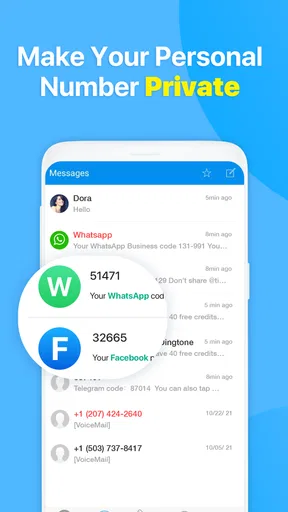
Let’s talk about privacy because, honestly, that’s probably why you’re interested in the app in the first place. It keeps your personal number under wraps, protecting it from spam calls and texts. Plus, if you're like me and sometimes forget to respond to texts, the app’s notification system is on point. You won’t miss a message or call again.
The app also allows you to block numbers, which is a godsend if you’re trying to dodge unwanted contacts. And for those who are extra cautious, there's a call recording feature. Just make sure you know the legalities in your area before you hit record.
Usability and Interface
Now, onto the user interface. It’s clean, intuitive, and doesn’t bombard you with unnecessary features. You can customize your settings to suit your needs, and the navigation is straightforward. Even if you’re not tech-savvy, you’ll find the app easy to use. It’s designed to make your life simpler, not complicate it.
The app runs smoothly without any glitches. I’ve yet to experience any crashes or freezes, which is a huge plus. There’s nothing worse than an app that kicks you out when you need it the most.
Perfect for Business or Personal Use
Whether you’re a freelancer needing a dedicated line for clients or just someone who wants to keep their number private, this app has you covered. It’s versatile enough to cater to a wide range of needs. You can even use it while traveling, as it doesn't rely on traditional phone networks.
For those who like to keep things organized, the app allows you to categorize your contacts and messages. It's like having a personal assistant managing your communications. This feature also comes in handy if you’re juggling multiple projects or clients.
Wrapping It Up
All in all, the app is a powerhouse that delivers on its promises. It’s easy to set up, loaded with useful features, and perfect for anyone looking to separate their personal and professional lives. Plus, the added layer of privacy is something we can all appreciate in this digital age.
It has a 4.0 average from around 80 thousand ratings, with about 4.2 thousand written reviews and over 5 million installs. The app is free to download, rated for Everyone, and its current version is 2.4.3; optional in-app purchases range from $1.99 to $24.99 per item. Those purchases are a reason to check the terms of any feature you plan to rely on rather than assuming every part of using a second line will remain free.
If you’re in need of a second line, I’d say give this app a shot. It’s a nifty solution without any of the usual hassle. You can find it on both Android and iOS platforms, ready to download and revolutionize your communication game. My practical verdict is more measured: it is most appealing when a separate number solves a specific, recurring problem, and less compelling when you need the certainty of a conventional primary line. The app is free to try, but I’d test the basic workflow with a low-stakes conversation before making it central to work or personal plans.
Pros
- Easy setup process for quick access.
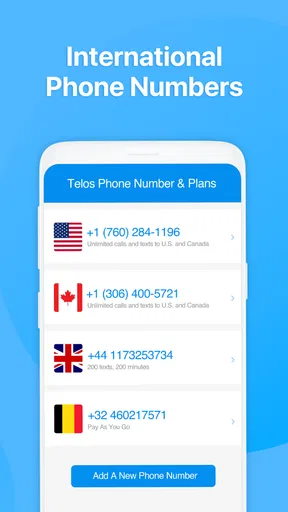
- Offers multiple numbers for flexibility.
- Affordable pricing for premium features.
- User-friendly interface with intuitive navigation.
- Good call quality with minimal disruptions.
Cons
- Limited free features compared to competitors.
- Ads can be intrusive in the free version.
- Occasional lag in message delivery.
- Requires an internet connection to function.
- Some features are region-specific.
FAQs for 2nd Phone Number: Text & Call
What is 2nd Phone Number: Text & Call used for?
2nd Phone Number: Text & Call is an app that allows users to create a second phone number on their device for calling and texting. This is particularly useful for separating work and personal communications, or for maintaining privacy when interacting with businesses or social media contacts.
Is 2nd Phone Number: Text & Call secure and private?
Yes, the app is designed with privacy in mind, ensuring that your personal number is not exposed. The app uses encryption for calls and messages, providing a secure communication channel. However, it is always recommended to review the app's privacy policy to understand how your data is managed.
Does the app require an internet connection to function?
Yes, 2nd Phone Number: Text & Call requires an internet connection to operate. It uses Wi-Fi or mobile data to send and receive calls and texts. This means you need to be connected to the internet to use the app, similar to other VoIP services.
Are there costs associated with using the app?
The app may offer both free and paid plans. While basic features might be free, advanced functionalities like unlimited calls or texts, additional numbers, and international calling might require a subscription or in-app purchases. It's advisable to check the app’s pricing details before downloading.
Can I use 2nd Phone Number: Text & Call for international communication?
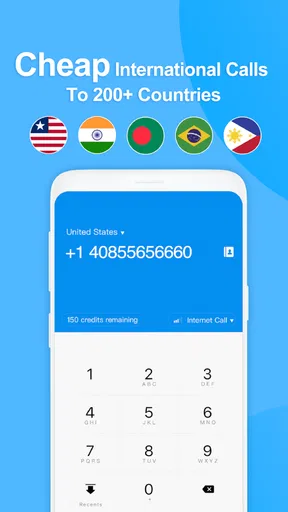
Yes, the app supports international calling and texting, making it a great option for users who need to communicate across borders. However, international services may incur additional charges, so it's best to review the app’s rates for international usage to avoid unexpected costs.


